
What is Google Analytics?
Google Analytics (GA) is a free service provided by Google to collect and display data about the activities of customers on your website. GA is one example of a number of web analytics ?Tracker? applications that can be added to websites for this purpose. Special code is added to your website in order to enable GA to receive information about where traffic is coming from, which pages do customers visit (and for how long), details about completed transactions, and more. Many vinSUITE clients are already using Google Analytics to track their website.
What is Google Tag Manager?
Google Tag Manager (GTM) is an additional free service provided by Google which helps you install and manage multiple ?Tracker? applications from one place. Think about it as if it is a ?container? that you can put multiple tracking tags into. The container gets installed on your website, then you add/remove Trackers (Tags) within the Google Tag Manager site. For example, GTM can contain tracker tags for Google Analytics, Google AdWords, and many other external services including services that use pixel tracking. vinSUITE has a Google Tag Manager integration, which provides more functionality than our GA integration - we recommend all vinSUITE clients that want to use Google Analytics should use Google Tag Manager integration and then add a Google Analytics tag into their Google Tag Manager container.
What is the benefit of using Google Tag Manager with Google Analytics on my vinSUITE website?
Google Tag Manager allows you to add other tracking tags as well as the Google Analytics tag.
What is the new Google Analytics and Google Tag Manager Enhanced Ecommerce feature?
Our updated Enhanced Ecommerce integration will give you better insight into your promotions, product and sales performance, as well as shopping and checkout behavior. The Google Overview and Product Performance reports show you helpful info such as the conversion rates for your products, how many products the average transaction includes, and the average order value. Not included in this integration but slated for future development is data on adding and removing products from shopping carts and product category details.
Is there a cost associated with using Google Analytics or Google Tag Manager integration with vinSUITE? How about Enhanced Ecommerce?
No, GA/GTM is a free integration that we incorporate into your vinSUITE website whether you are using the basic or the Enhanced Ecommerce versions. Clients are responsible for setting up their free GTM and GA accounts, then sending the GA or GTM account ID to vinSUITE staff for installation. There is no charge for this service. Note that vinSUITE staff is not available for training or troubleshooting in the GTM or GA applications.
So how do we get started?
1. Set up a Google Analytics account -- NOTE: We do not currently support the GA4 version of Google Analytics- Universal Analytics account (basic):
- Whether you are setting up a new account, or already have one, we recommend that you make sure the Enable Ecommerce setting is turned ON
- Copy your GA Tracking ID, you?ll need it for setting up GTM. This ID will look something like this: UA-99999999
- Universal Analytics Enhanced Ecommerce
- Admin >> Create Property
- Set Property Name-- Note: Do NOT choose GA4 option
- Show Advanced Options
- Toggle on ?Create a Universal Analytics property?
- Enter website URL
- Select ? Create a Universal Analytics property only?
- Create
- Admin >> View (All Web Site Data) >> Ecommerce Settings
- Toggle on ?Enable Ecommerce?
- Toggle on ?Enable Enhanced Ecommerce Reporting?
- For easier parsing of Checkout data, add Checkout Labeling:
- 1 = Cart, 2 = Shipping, 3 = Billing, 4 = Payment (most sites)
- 1 = Cart, 2 = Personal Info, 3 = Payment (if your site does not have one page checkout)
- Admin >> Create Property
2. If you want to use Google Tag Manager set up a Google Tag Manager account for your website if you don?t already have one. You?ll need to add a your Google Analytics tag to your Google Tag Manager container
- Overview >> Add a new tag
- Tag Configuration: choose tag type ?Google Analytics: Universal Analytics?
- Track Type: Page View
- Check ?Enable overriding settings in this tag?
- Enter Tracking ID (from property setup in Google Analytics)
- More Settings >> Ecommerce
- Set ?Enable Enhanced Ecommerce Features? to true
- Check ?Use Data Layer?
- Tag Configuration: choose tag type ?Google Analytics: Universal Analytics?
- Triggering: choose All Pages
- Save
- Publish container
3. Copy your GA or GTM ID, which looks like this: UA-xxxxxxxx or GTM-xxxxxxx
4. Send an email to support@vinsuite.com and request that they install the ID-- be sure to tell them if you set up GA or GTM Enhanced Ecommerce
5. vinSUITE staff will install and confirm the integration is working via Google Tag Assistant
Now what?
You can now use Google Analytics to view website traffic and checkout behavior. With Enhanced Ecommerce you can view reports on conversion rates for your products, how many products the average transaction includes, average order value, and more. This is located in the Conversions >> Ecommerce area of the Google Analytics Admin.
*Note that most data in Google Analytics is available the day after it occurs. Most data is not displayed in real-time. 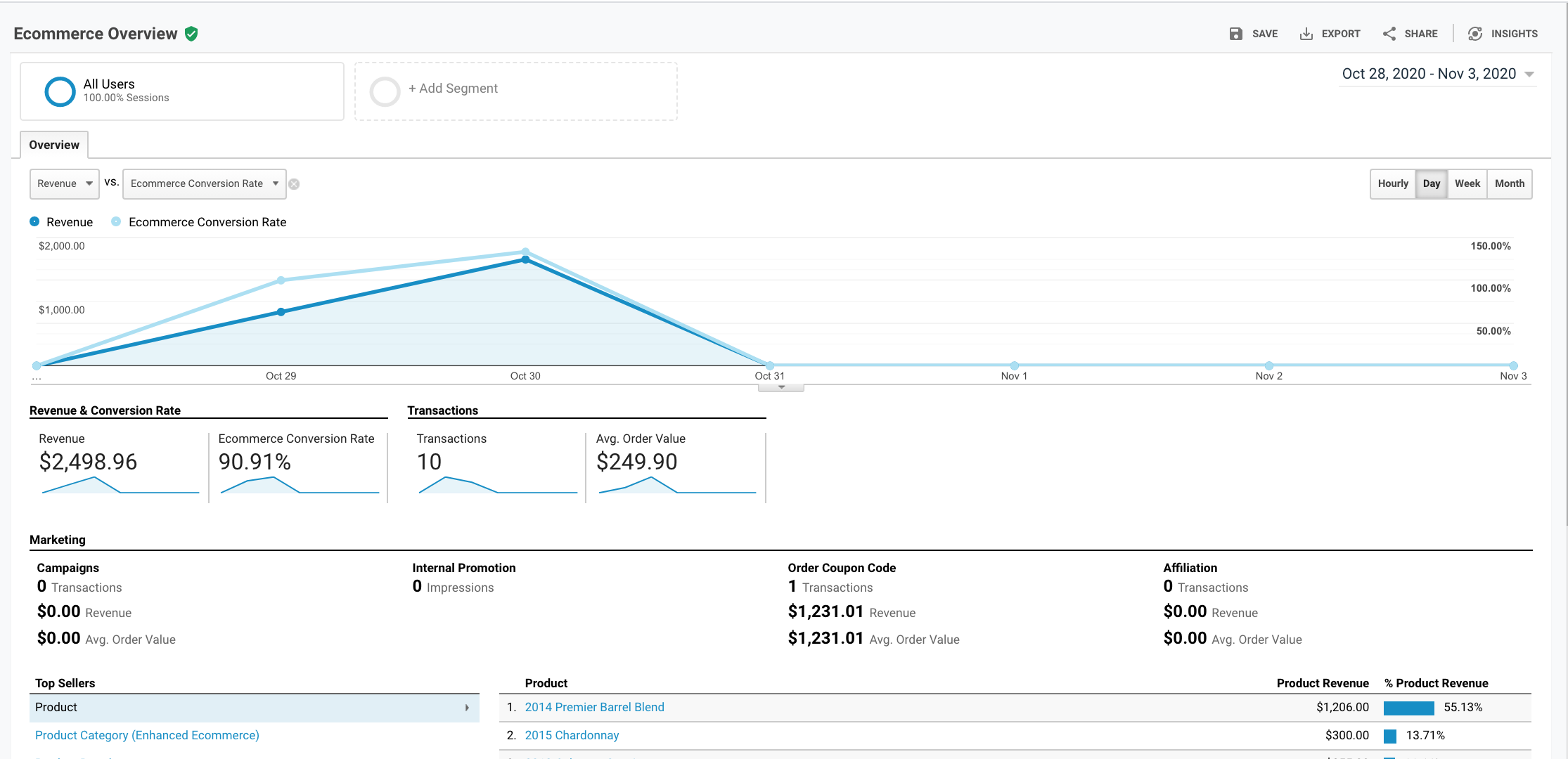
Additional tools:
We recommend that you also set up the vinSUITE custom dashboard. Click here to add the vinSUITE Analytics dashboard to Google Analytics
Dashboard features:
- Custom ?vinSUITE Website Dashboard? with 7 different metrics to help you visualize where your traffic is originating from and how visitors are interacting with your site
- Drilldown reports to show additional information on the above metrics
- Goal Funnel configuration for Wine Club Signup and Website Checkout - these allow you to use the Funnel Visualization in Google Analytics reports