
Shipping Options in vinSUITE
The vinSUITE application accommodates both wine shipping and product shipping. By configuring a few shipping tables in vinSUITE, the system is able to accurately calculate the shipping costs for an order. These costs are based on the number and size of bottles of wine or per pound for non-wine products
Best Practice: Shipping costs are usually determined by the product size, weight, and shipping destination. It is strongly recommended that you complete the following steps, in order, to set up the shipping location, types, and rates in vinSUITE.
1. Define your Shipping Zones
Detailed on the Setting Up Shipping Options: Zones page
2. Assign every State to a Shipping Zone
Detailed on the Setting Up Shipping Options: Zones page
3. Designate your Shipping Types
Detailed on the Setting Up Shipping Options: Shipping Types page
4. Establish Shipping Rates for each Shipping Type by Zone
Detailed on the Setting Up Shipping Options: Shipping Rates page
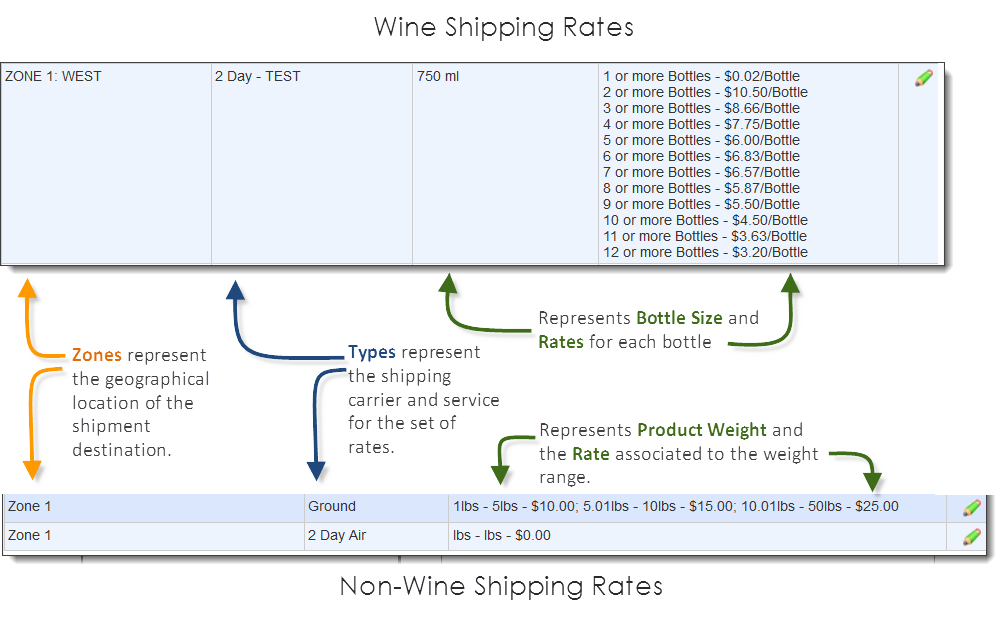
Note: Wine products and non-wine products are evaluated differently on weight and size to establish Shipping Rates. Wine products are measured by Bottle Size and Shipping Rates are based on the number of bottles. Non-wine products are measured by weight and Shipping Rates are determined by the combined weight of products.