
Table of Contents
Bottle Weight
Scenario: Client updated bottle weight in Products page after they saw a mistake in Fulfillment. Why hasn't the weight updated yet when they try to create a label?
Solution: The bottle weight is written to the sales order when the order is created, so if the bottle weight in the PRODUCT screen is modified after the order is written, the bottle weight contained in the original order is NOT updated. Edit the completed order in OMS and remove/re-add the item(s) to display the updated weight in Fulfillment.
General
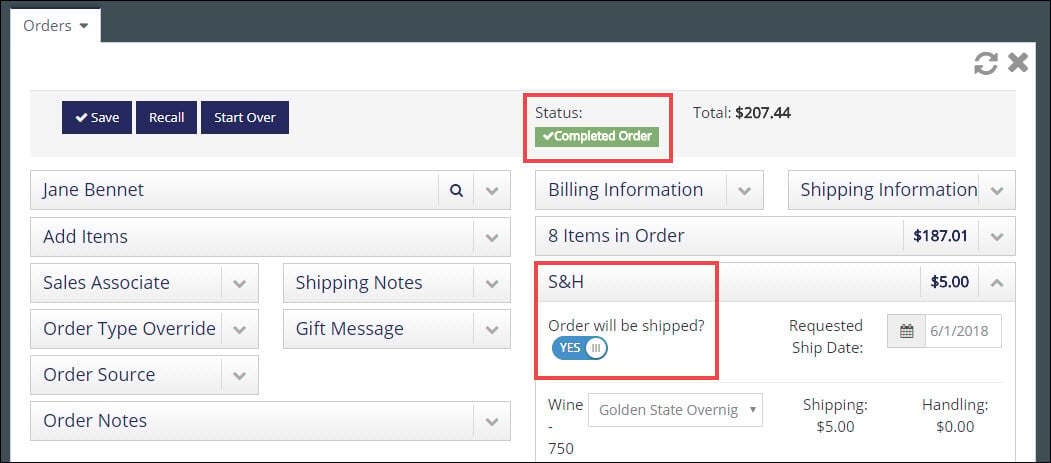
Scenario: Why aren't orders populating in the Order Fulfillment section?
Solution: Once the Fulfillment settings are configured correctly, all orders that have the Shipping toggle set to "YES" in the Shipping and Handling section and have a 'Completed' order status, should display Order Fulfillment. You are now ready to process Fulfillment Orders!
Printing
Scenario: Client successfully created the shipping label in Fulfillment, but doesn't see a Print button. How do you Print a shipping label in Fulfillment?
Solution: The client needs to click directly on the label and a printable version of the label will appear in another tab on their browser. From the printable version, they can copy or save the image.
Note: The Packing Slip and Invoice for the order have 'Print' buttons available from their respective pages in vinSUITE.
Alternatively, the client can also log into in to the UPS or FedEx websites with their account information and print the labels they created in vinSUITE.